Documentation - old
Exploring a huge collection of documents is challenging and sometimes overwhelming. Typically the only means of access to large repositories of declassified information is to start entering keywords in a search box. But research in the world of legal discovery has shown that we are usually wrong to assume we know which words are actually “key.” The average user misses some 80% of relevant documents. Even for the documents we do find, it can be difficult or impossible to reconstruct their original context or significance. Digital archival research becomes a fishing expedition, in which we pull out one catch after another, throw most of them back, and finally seize on what may turn out to be a red herring.
What most of us are actually looking for is some way to make sense of the whole archive, and begin identifying the clusters of related documents that are most representative of the topics we are actually interested in. Luckily, computer scientists have developed a technique to accomplish this very thing, which they call topic modelling. History Lab is offering one of the first user-friendly ways to use this powerful method of exploration.
To generate our topics we use LDA (Latent Dirichlet Allocation), a technique that treats each document as a bag of words, and then provides a probabibility that a word is generated by a certain topic. Read this paper by Blei, Ng, and Jordan for more details about LDA. We eliminate stopwords using NLTK, and only use words which appear in NLTK wordnet for the process (to eliminate badly OCR'd language). We also use Vowpal Wabbit to efficiently and rapidly complete the modeling process, and set a limit of 100 topics for each collection. Once the algortithmic portion of the modeling process is complete, domain experts read a set of the documents for each topic, and assign a descriptive title to each topic. The domain experts also discard topics which they do not consider meaningful. As such, this is a curated set of topics, and is intended as a tool for exploration. It would be a mistake to make claims about the nature of the corpus based on these topics, since we have excluded data that was not well described using this method.
You can use our topic functionality in two ways: First, in the overview page, you can see the top topics for each collection, ordered by how many documents are associated with that topic. You can then click on any of these topics to return a list of documents that are most representative of that topic. To the left of this list, you can see the most similar topics to the one you have selected, and clicking on any of these will return a new set of associated documents.
Second, in the search page you can choose any of these topics as an entity, (in the same way that countries and persons can be selected as entities). This will filter the search to only those documents associated with the selected topic or combination of topics. And you can combine the topic with any of these other entities, so “Arab-Israeli Relations” combined with John F. Kennedy, Saudi Arabia, etc. This allows the researcher to more easily investigate connections between peoples, places, and themes.
When on the topics page, users can also see the top "tokens", or words, which define each topic. It will be self-evident how certain tokens relate to the curated topic at hand, for example the tokens "Vietnamese" and "Thai" in the "Politics in Indochina" topic. However it might be less apparent why other tokens belong in a topic, and one should not expect every token to be specifically relevant to the topic. Certain tokens will appear because of specific features of the documents in the topic. For example the "Politics in Indochina" topic also features the token "Airlift" - this is because many of the documents we have which belong in this topic involve the evacuation of American troops and personnel from Saigon, which often relied on airlifts. Finally, there will be tokens where the meaning is even harder to ascertain. This is because no one topic perfectly characterizes every document within that topic. There will always be documents which are not encompassed by the curated topic name, but share certain linguistic affinities with other documents in the topic. Some tokens will come from documents which fit this category.
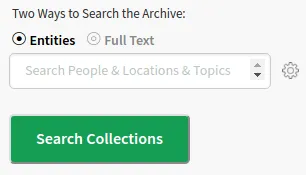
The History Lab collections allows users to search the document collections by three “entities,” Person, Country, and Topic. When you begin to enter letters in the search box, auto-completed options will pop-up. And when you select a date range using the sliders on the center of the page, the display will offer re-ranked lists of the most important persons, topics, etc. You can also combine entities in a search, for example "Richard Nixon" and "China". Use the settings button to determine whether you want an "and" or "or" search. "And" will return documents with both Nixon and China in the same document, whereas "or" will return all documents that feature either Nixon or China.
For the FRUS collection, country mentions are extracted through a process called Named Entity Recognition (NER). This is a technique in which an algorithm combs through documents and identifies mentions of predetermined entities (typically Person, Location, and Organization). There are a number of open source NER classifiers, the most popular of which is the Stanford NER Tagger.
But NER is never perfect. The names of countries change, people refer to them in various ways -- not always by name -- and the people themselves have names that NER classifiers might not recognize (especially if they are from non-Western countries, and the names are transliterated in multiple ways.) Even when a classifier is adapted and “trained” for specific genres of texts, like CLIFF for MediaMeter, it will still miss certain entities and misconstrue others.
Given the historical nature of our collection, and the peculiarities of official correspondence, we did not want to rely on a predetermined annotation or tagging criteria to extract and enumerate mentions of countries. Instead, we developed our own guide for tagging, to ensure that countries were counted in all circumstances where they implied an official mention of the country. For example, we are interested in mentions of cities, countries, nationalities, and organizations when they stand in for a government. Consider, for example, this sentence: “The British agreed with our proposals about Iran when we met in Stockholm.” We want to count this document as one referencing both Britain and Iran, but not Sweden. We also need to capture abbreviations, such as “GOT,” for Government of Tunisia, and distinguish it from GOT when it stands for Government of Turkey. Abbreviations are more common for some countries than for others, such as UK, USSR, etc. And diplomats sometimes refer to their counterparts by the location of their foreign ministry, such as Quai d’Orsay (for France) or Palazzo Chigi (for Italy.)
This work began with the manual annotation of FRUS documents according to an established guide. We used this data to “train” our algorithm to make the same distinctions, and then ran it over all the data, sorting different entities into the appropriate categories. Once this process was complete, we routed all the mentions we are interested in to the appropriate primary entity (a country, in this case) in the post-processing phase. We did this by first using “regular expressions” to map all appropriate mentions, such as capital cities and common acronyms, to the correct country. After this, we manually verified the remaining unmapped “official” mentions and matched them to the appropriate entity.
For the cables collection, we are currently working on a comprehensive NER project to extract countries, people, and organizations according to our own criteria. For now, the countries we have extracted correspond to the TAGS (Traffic Analysis by Geogragpy and Subject) assigned to each cable by State Department officials. These TAGS encompass the countries which the cable are about. As for Kissinger, Clinton, and DDRS, we extracted countries using our custom made "geotagger". This geotagger employs a regex approach to find all acceptable mentions of a country or city in the text of the documents - similar to the method we used to map mentions to the appropriate entity after the NER phase in the FRUS country project.
In evaluating and refining the geotagger, we aimed to balance two goals: identifying and enumerating mentions of all countries, while minimizing the risk of under or over-counting any particular one. For instance, while one can imagine many different ways of referring to this or that country, it is difficult if not impossible to be equally comprehensive for all of them. So in addition to Soviet Union, Russia, the Soviets, the Russians, and Moscow, one could also refer to “the communists,” “the Kremlin,” or just “the enemy.” Similarly, abbreviations are more common for some countries than for others, such as the UK, USSR, etc.
If we tried to come up with all of the alternatives for referring to this or that country, it is inevitable that we will be more successful in some cases than for others. We therefore erred on the side of consistency. We chose a relatively spare list limited to the names of countries, their capitals, and their nationalities.
In addition to errors from missing mentions of this or that country, regex approaches also have the opposite problem, the “Paris Hilton problem.” In this case, Paris would be counted as a mention of France, rather than a person (or a hotel). Similarly, some capitals were the site of important diplomatic agreements, such as the Helsinki Accords. So mentions of the “Treaty of Rome” will count as mentions of Italy. Finally, Congo can refer to either of two countries, or just to the river that runs through them.
Other limitations have to do with text case. Certain countries are often referred to in abbreviated acronym form, and we include these acronyms as a component of our country regex. However, if a document is entirely upper-case, then these acronyms might actually be words in the document. This was a problem which arose with FRUS, since this collection hosts a number of cables in upper case. Upon analysis, we discovered that these cables start consistently with "Telegram [xxxx] from the Embassy" or "Telegram [xxxx] from the Department of State", with the x's standing in for some sequence of numbers. Using this information we found that 1157 documents within the collection that are capitalized, and therefore potentially miscounted. This represents a relatively small proportion, around 1.5%, of the entire collection. These limitations of the regex method are the reason that we are shifting our approach for country extraction to the NER method explained above for FRUS.
In order to extract person mentions for FRUS. We used a comprehensive list of people provided through the office of the historian github account. We combed through the text of the FRUS collection to find each mention of these people, accounting for variation in spelling and presentation. For the Clinton collection, we used the "from" and "to" information provided as metadata with the emails to ascertain the people involved in correspondence. This required an extensive process of disambiguation, where we resolved email addresses to the person who sent or received the email, and accounted for the various aliases which people use for their email account. Since the time-span for the Kissinger collection overlaps with FRUS, we used the same comprehensive list of persons provided by the Office of the Historian to comb through the Kissinger collection and find all person mentions. For the Cabinet papers, our persons information comes from "attendees" metadata provided to us by the UK National Archives. This attendees information catalogues who was present for Cabinet meetings according to the minutes, it is thus restricted to the approximately 8 thousand documents that are "conclusions". Please note, we are still in the process of ensuring all the persons mentions in the Cabinet collections are linked to other collections where the same people are mentioned. Eventually this will ensure that searching for a name within the Cabinet database will return all documents for that person within the Cabinet papers and any other collection they are mentioned in.
We have also isolated and stored classification information, allowing users to search any combination of secret, confidential, limited official use, or unclassified documents (as well as various other classifications which are collection specific). In the case of the State Department and the Declassified Documents Online collections, classification information was provided to us as part of the general metadata provided with the documents. In the case of the Clinton Email, the classification information we have is applicable to the entire thread (there is no email specific classification information). Thus the classification information we show for each email is the classification for the thread to which it belongs.
For the FRUS collection we had to programatically extract the classification of the documents. We did this by finding mentions of the documents classification level first in the "source" field, and if it was not there than we looked within any embedded source fields within the body text. If a source field could not be found, then we looked for classification information in between the title and the start of the body text, and finally within the title of the document itself. This resulted in classification information for about 75% of the documents in FRUS - it is likely that many of the remaining documents are editorial notes, or other reports with no visible secrecy information.
The Freedom of Information Archive can be explored using an n-gram viewer, a visually intuitive way to track ideas and concepts as they change over time.
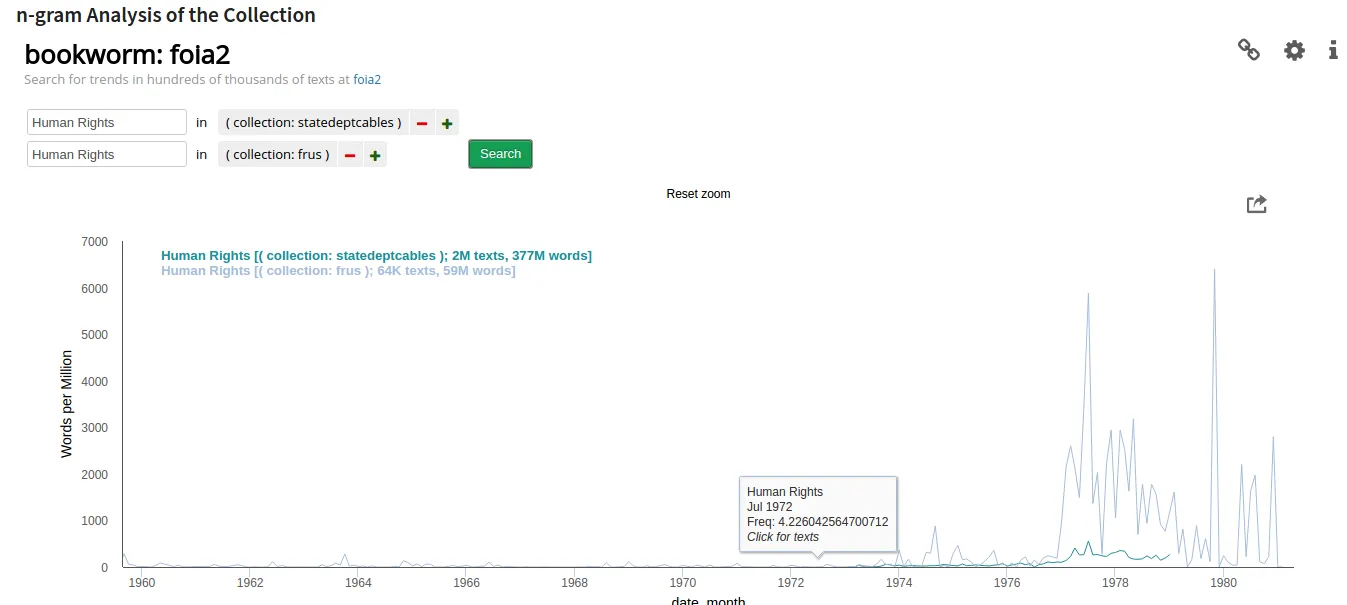
Our n-gram system was developed using Bookworm technology. The body field of the text for a collection is divided up into words, or strings of two words. The number of instances is then counted per million words in the collection, and plotted against time in a chart. The user can also choose in the settings to chart the relative number of documents that include the term, or display the absolute rather than the relative number of either words or documents.
The search can be further restricted by collection, person, or country. Just click on the box to the right of the search box, and choose accordingly. The chart will then only display the number of times the term appears in documents that belong to a particular collection, or mention a particular person or country. N-gram graphs can also be compared against each other, so researchers can contrast the usage of different terms in the same collection, or the same terms in different collections - all in the same chart. Note that topics are specific to collection, so if you search the topic "International Development Aid," you will be restricting your search to documents from FRUS, since the topic belongs to this collection. Similarly, with countries, if you select a country then your results will be restricted to those collections where we have extracted country mentions.
The n-gram draws entirely on the terms in the collections, and as such is susceptible to the same limitations as full-text searching in terms of documents with garbled text, redacted text, etc. Also, Bookworm has kindly processed our collection and allowed us to use their platform. But that means that History Lab will not be able to address specific bugs and problems on our own. Instead, we are working with Bookworm to maximize the versatility of their code for varying corpora, and welcome your comments or suggestions to ensure the best possible results for History Lab collections.
Full text searching allows the users to look for particular words and phrases within the body text of the documents for a collection. There is no need to enclose phrases within quotation marks. The search function, which is based on Elasticsearch, will automatically retrieve documents with the same words in the same order, and rank them in terms of relevance. Relevance is determined by the relative proportion of the selected terms compared to all the other words in a document. So a short document with just a few of the terms you search for might rank higher than a longer document with more instances of the same term.
A common but little-noticed problem with full text searching of historical document collections is that many documents have garbled text because the original image quality was poor, or because they were processed with outdated optical character recognition (OCR) software. But the Freedom of Information Archive consists almost entirely of “born digital” text. The exceptions are limited to the Clinton e-mail and about eight percent of the DDO collection.
That said, some text was lost before the documents were ever released to the public. About eleven percent of the State Department cables we received from the U.S. National Archives have error messages or blank text, and this is especially true of the “Secret” cables. Finally, some of our collections are redacted, including the Clinton e-mail and FRUS. We have done some analysis of the names most likely to be redacted, but there is obviously much more work to be done to correct for undercounting.
Merriam Tech provides The Freedom of Information Archive with two features, both of which are oriented around finding documents with similar characteristics. The first feature appears after a user has selected a document to view. Along the right hand side of the screen, they will see a list of similar documents retrieved by Merriam. The criteria include semantic similarities as the default setting, which works similarly to text drop. But users can “edit similarity criteria” to change their preferences. So you can increase the weighting for people or countries to view documents that involve some of the same people and/or countries.
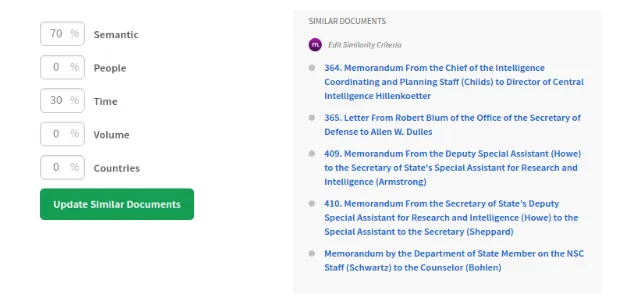
Or you can reduce the weighting for other criteria and increase the weighting for time, if you want to see what other documents were being written on the same day. Or, if you are working in FRUS, you can increase the weighting for Volume, so it prioritizes documents from the same volume as the document you are looking it. Note that searching for documents with the same people and countries only works for collections like FRUS and the Kissinger telcons that have been fully processed. For others, like the State Department Cables, you will need to use full-text searching.
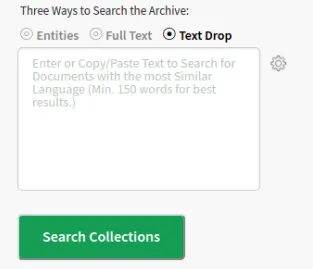
The second tool is text drop, which allows users to enter or paste some text into a box, and then retrieves documents with similar language. For best results, the text you enter should be at least 150 words. At the moment text drop is not quite production ready and has been temporarily disabled, but we hope to have it available for all collections soon.
Users will be able to employ this feature in several ways. They may have a document that serves as a good example of something they are looking for, and they wish to see whether there are other, similar examples of the same thing. Or they might use this tool to find analogous language across time, such as similarities in how U.S. leaders have described allies and adversaries. And they can use it to see how a department or agency might use a distinctive kind of language.